



Business continuity planning is an important part of maintaining reliable digital operations. Companies increasingly depend on remote servers, cloud applications, databases, and virtual desktops to keep employees productive. When an unexpected event affects IT infrastructure, having a dependable recovery strategy can help reduce downtime and protect essential business functions. A Windows VPS RDS CAL setup can become an important component of this strategy when it is properly planned, secured, and maintained.
Understanding Windows VPS RDS CAL
A Windows VPS, or Virtual Private Server, provides a virtualized server environment that can host applications, files, databases, websites, and remote desktop services. Businesses can use a Windows-based VPS to provide employees with access to a centralized computing environment without requiring every application or resource to be installed locally.
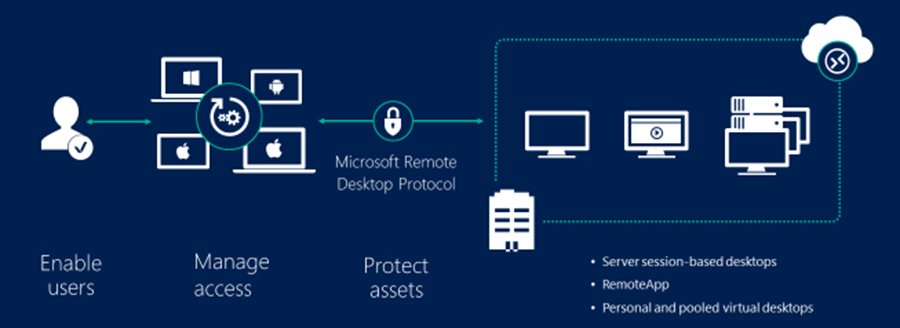
Remote Desktop Services, commonly known as RDS, allow authorized users to connect to a Windows server remotely. An RDS Client Access License, or CAL, is a licensing requirement associated with accessing certain Microsoft Remote Desktop Services features. Depending on the environment and licensing model, businesses need to ensure that their users or devices have the appropriate licensing.
The combination of a Windows VPS and properly licensed RDS infrastructure can support remote working and centralized administration. More importantly, it can contribute to business continuity by allowing employees to access important applications and resources from different locations when normal office operations are disrupted.
Why Business Continuity Matters
Business interruptions can occur for many reasons. Hardware failures, software problems, network outages, cyber incidents, power disruptions, and natural disasters can affect business operations. Even a short interruption can create productivity problems when employees cannot access essential applications or files.
A business continuity plan establishes procedures for maintaining or restoring important operations during such events. IT infrastructure is usually one of the most important areas of this plan because employees often need immediate access to communication tools, business applications, customer records, financial systems, and shared documents.
A properly configured Windows VPS RDS CAL environment can provide a centralized platform that supports remote access. Instead of depending entirely on computers located inside a physical office, authorized employees can connect to their business environment remotely when appropriate.
Remote Access During Disruptions
One of the main advantages of a Windows VPS environment is accessibility. Employees can potentially connect to a hosted Windows desktop or application environment from another location, subject to network availability, security controls, licensing, and organizational policies.
For example, if employees cannot reach an office because of a building issue or local infrastructure failure, a remote Windows environment may allow them to continue performing essential tasks. This can be particularly useful for organizations with distributed teams or employees who already work remotely.
However, remote access should never be treated as the entire business continuity strategy. Organizations should identify critical applications, define recovery procedures, maintain backups, and establish alternative communication methods.
Backup and Data Recovery
Backups are a fundamental part of business continuity planning. A VPS can host important applications and information, but businesses should not assume that storing data on a server automatically protects it from every type of failure.
Organizations should establish a backup schedule based on their operational requirements. Critical information may require more frequent backups than less important data. Backups should also be protected from unauthorized access and, where appropriate, stored separately from the primary production environment.
Testing backups is equally important. A backup that has never been restored cannot be considered fully reliable. Periodic restoration tests can help confirm that files, applications, and configurations can actually be recovered when necessary.
Protecting Remote Desktop Access
Security is a critical consideration when using Windows VPS RDS CAL infrastructure for business continuity. Remote desktop services can provide valuable flexibility, but exposed or poorly configured remote access can increase security risks.
Businesses should use strong authentication practices, apply security updates, restrict unnecessary network access, and give users only the permissions they need. Multi-factor authentication may also provide an additional layer of protection where supported by the organization’s environment.
Monitoring login activity and reviewing access permissions can help administrators identify unusual activity. User accounts that are no longer required should be disabled or removed according to organizational procedures.
Planning for Server Failure
A business continuity plan should account for the possibility that the primary VPS itself becomes unavailable. Organizations should determine how critical services will be restored if the main virtual server experiences a serious problem.
Depending on business requirements, recovery strategies may involve additional infrastructure, replicated systems, backup servers, snapshots, or alternative hosting arrangements. The appropriate approach depends on factors such as budget, workload, recovery objectives, and the importance of each application.
Two useful concepts in this planning process are Recovery Time Objective (RTO) and Recovery Point Objective (RPO). RTO defines how quickly a service needs to be restored, while RPO defines how much recent data the organization can potentially afford to lose.
Licensing and Compliance Considerations
Businesses using Windows VPS RDS CAL environments should pay attention to licensing requirements. The technical ability to connect to a remote Windows server does not automatically mean that the licensing arrangement is appropriate.
Organizations should determine whether their licensing model matches their users, devices, server configuration, and intended use. Keeping accurate records can also make administration easier as the company grows.
Licensing requirements can change depending on the Microsoft products and services being used, so businesses should verify current requirements through appropriate Microsoft licensing documentation or a qualified licensing professional.
Testing the Business Continuity Plan
A written plan is useful, but testing is what helps reveal weaknesses. Businesses should periodically simulate scenarios such as server failure, loss of office connectivity, unavailable employees, or recovery from a backup.
During a test, administrators can check whether users can access required resources, whether authentication works, whether backups can be restored, and whether employees understand their responsibilities.
Testing can also reveal outdated contact information, missing documentation, insufficient capacity, or unexpected application dependencies. The business continuity plan should then be updated based on the findings.
Creating a Practical Recovery Strategy
A practical strategy begins by identifying essential business services. Organizations can then determine which systems support those services and establish recovery priorities.
For a Windows VPS RDS CAL environment, the plan may include server configuration documentation, user account information, backup procedures, security controls, recovery contacts, licensing records, and instructions for restoring services.
Documentation should be stored somewhere accessible even if the primary IT environment is unavailable. Authorized personnel should know where to find the recovery information and how to begin the recovery process.
Conclusion
Windows VPS RDS CAL infrastructure can support business continuity by providing centralized Windows-based resources and remote access for authorized users. However, technology alone does not create a complete continuity plan. Reliable backups, security controls, recovery procedures, licensing compliance, monitoring, documentation, and regular testing are all essential components.
By combining a properly managed Windows VPS RDS CAL environment with a structured business continuity strategy, organizations can prepare more effectively for unexpected disruptions. The goal is not simply to keep a server online, but to ensure that critical business operations can continue or be restored efficiently when normal working conditions are interrupted.