

Introduction
The GM TECH2 is one of the most powerful and widely used diagnostic tools for General Motors vehicles. Whether you are a professional mechanic or an automotive enthusiast, mastering the GM TECH2 can significantly improve your ability to diagnose, troubleshoot, and maintain vehicles efficiently. However, many users only scratch the surface of what this tool can actually do.
In this article, we’ll explore eight practical tips to help you get the most out of your GM TECH2. By following these strategies, you can unlock its full potential and enhance your diagnostic capabilities.
Understanding the Basics of GM TECH2
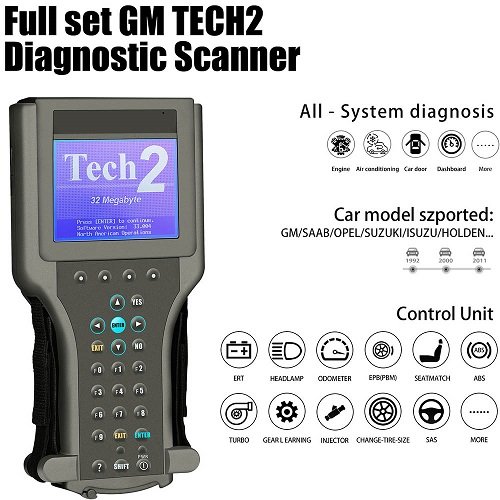
Before diving into advanced tips, it’s important to understand what the GM TECH2 is designed for. The GM TECH2 is a handheld diagnostic scanner used for reading and clearing trouble codes, performing system tests, programming modules, and monitoring real-time data in GM vehicles.
Familiarizing yourself with its interface, buttons, and menu navigation is the first step toward using the tool effectively. Spend time exploring its features so you can work faster and more confidently.
Keep Your GM TECH2 Software Updated
Why Updates Matter
One of the most important tips for using GM TECH2 effectively is ensuring that its software is always up to date. Updated software allows the tool to support newer vehicle models and improves compatibility with various systems.
How to Stay Updated
Regularly check for software updates and install the latest versions. Updated firmware ensures better performance, fewer errors, and access to the newest diagnostic features. Ignoring updates can limit the functionality of your GM TECH2 and lead to inaccurate diagnostics.
Use Genuine Accessories and Connections
Avoid Compatibility Issues
Using original cables and connectors with your GM TECH2 is crucial. Cheap or incompatible accessories can cause communication errors between the tool and the vehicle.
Ensure Stable Performance
A stable connection ensures accurate readings and prevents interruptions during diagnostics. Investing in high-quality accessories will save time and reduce frustration when working with GM TECH2.
Learn to Navigate the Menu Efficiently
Speed Up Diagnostics
The GM TECH2 has a detailed menu system that can seem overwhelming at first. Learning how to navigate through menus quickly will save valuable time during diagnostics.
Practice Regularly
Spend time practicing common tasks such as scanning for codes, accessing live data, and performing system tests. The more familiar you are with the interface, the more efficient you’ll become when using GM TECH2.
Take Advantage of Live Data Features
Monitor Real-Time Information
One of the most powerful features of GM TECH2 is its ability to display live data. This allows you to monitor engine performance, sensor readings, and system behavior in real time.
Diagnose Issues More Accurately
By analyzing live data, you can identify problems that may not trigger error codes. This makes GM TECH2 an essential tool for advanced diagnostics and troubleshooting.
Perform Regular System Scans
Prevent Bigger Problems
Using GM TECH2 for regular system scans can help detect minor issues before they become major problems. Preventive diagnostics can save both time and money in the long run.
Maintain Vehicle Health
Routine scans ensure that all systems are functioning properly. This proactive approach allows you to maintain optimal vehicle performance using GM TECH2.
Understand Diagnostic Trouble Codes (DTCs)
Go Beyond Basic Code Reading
While GM TECH2 can read trouble codes, understanding what those codes mean is equally important. Simply clearing codes without proper diagnosis can lead to recurring issues.
Use Reference Materials
Always refer to repair manuals or trusted databases when interpreting DTCs. Combining this knowledge with GM TECH2 readings will lead to more accurate and reliable repairs.
Utilize Advanced Functions of GM TECH2
Explore Programming Capabilities
Many users don’t realize that GM TECH2 can perform module programming and system resets. These advanced features are extremely useful for modern vehicles.
Expand Your Skill Set
Learning how to use these functions will make you more versatile and efficient. Take time to explore all available options within your GM TECH2 to maximize its value.
Maintain and Store Your GM TECH2 Properly
Protect Your Investment
Proper maintenance of your GM TECH2 is essential for long-term use. Keep it clean, store it in a protective case, and avoid exposing it to extreme temperatures.
Ensure Longevity
Taking care of your device ensures consistent performance and prevents costly repairs or replacements. A well-maintained GM TECH2 will serve you reliably for years.
Troubleshoot Common Issues
Identify Connection Problems
If your GM TECH2 is not communicating with a vehicle, check the cables, ports, and power supply. Many issues are caused by simple connection errors.
Reset and Recheck
Sometimes, restarting the device or reconnecting it can resolve minor glitches. Knowing basic troubleshooting steps will help you avoid unnecessary downtime.
Conclusion
The GM TECH2 is a powerful diagnostic tool that offers far more than basic code reading. By keeping your software updated, using quality accessories, mastering navigation, and utilizing advanced features, you can significantly improve your diagnostic efficiency.
Whether you are performing routine maintenance or tackling complex vehicle issues, these eight tips will help you get the most out of your GM TECH2. With practice and proper usage, this tool can become an indispensable part of your automotive toolkit.